
Home |
Family Tree |
Viewing the Tree |
Missing Ancestors & Descendents |
Add Your Family
Maps |
Ellis Island |
Pelczarski Origin? |
Privacy |
Polish Translation? |
Send e-mail to Mark
To protect privacy, unless you log in you will only be able to see the oldest portions of the family tree. To see current relatives you must log in with a user name and password. You may request a user name and password if you are a Pelczarski or if you are closely part of the Pelczarski family tree.
To request a user name and password, please send an e-mail to Mark Pelczarski with your full name and an explanation of how you are related to the Pelczarski family. Please include names of those relations. Birthdates and locations of birth and/or residence are very helpful but not necessary.
The software we are using for displaying and editing this tree is capable of storing a great deal of information and notes about individuals and families, and even photographs. As time progresses we hope to add photos and stories as part of this tree to make it come alive, rather than just be a repository of names alone.
The data in the tree is stored in a standard geneology format (GEDCOM) and can easily be shared. This tree belongs to all of us and our children.
As with most software that is versatile has many features it takes a few minutes to get oriented. I will show you here a few of the quick ways to view and navigate the tree. As you get more comfortable later you can explore other options.
Here is the main menu:

Put your mouse pointer over "Lists", and you will see:
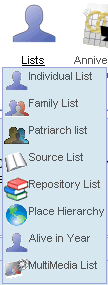
Click on "Individual List":
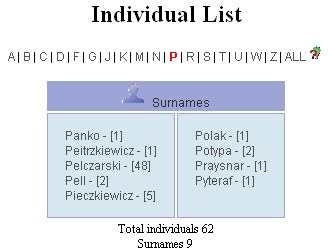
Here I've already clicked on "P" in the list of letters.
When you find your last name, click on it and you will see a list of all individuals with that last name. You should be able to find your name in that list. Click on any name and you will see that person's immediate family: father, mother, brothers and sisters, and children. Here is part of such a display:
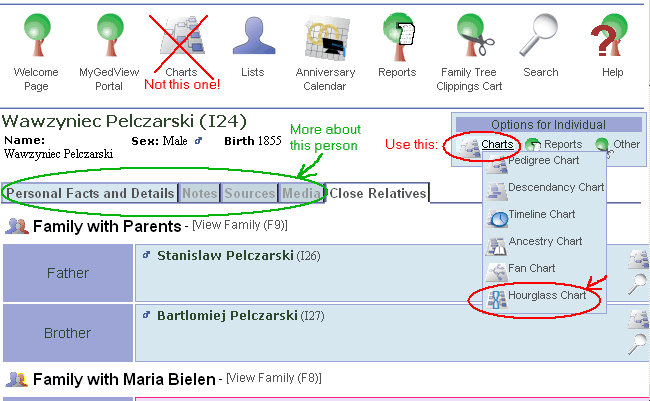
(this list continues down with all the children of Wawzyniec. In this case, his father is shown but the name of his mother is not yet in the tree)
At this point you can click on any individual's name that you see and a similar page will appear with that person listed on top, and father, mother, siblings, and children listed below.
You may also click the Personal Facts and Details, Notes, Sources, and Media tabs (circled in green)to see if there is any more information about this person.
To the right of the individual's name, there is a menu of "Options for Individual". Put your mouse over "Charts" and you will see the dropdown list that's shown above. (ALERT: There is also a "Charts" icon above the person's name in the main menu. But that icon does not link to a chart for this person.)
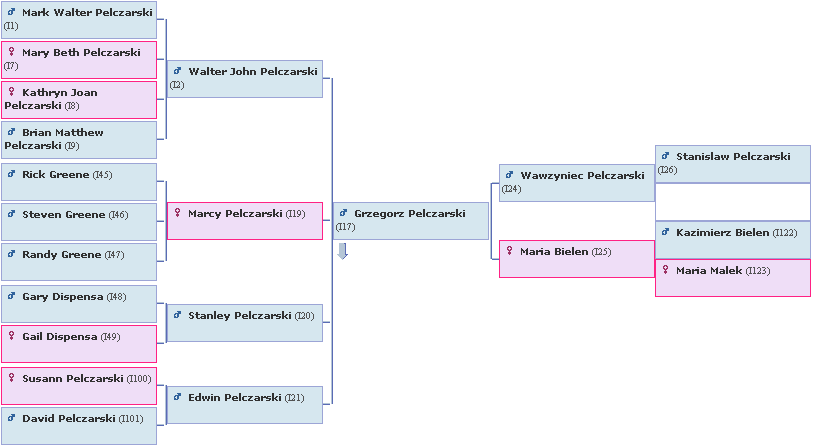
As one example, if you click the "Hourglass Chart" link (circled in red), you'll see a chart like the one below. (This one is for Grzergorz, not Wawzyniec.) Again, you will be able to click on any individual in the chart to see information abou that person.
This should give you a basic start and allow you to explore the entire tree and locate every individual. We hope you will help add to the tree so we can link together as many of our branches as possible.